

Got a spreadsheet full of GPS coordinates you’d like as mapcodes, or mapcodes you need as GPS coordinates?
Our free Excel converter does both. Paste in your list and the results fill in by themselves, one row at a time.
Download the free Excel converter
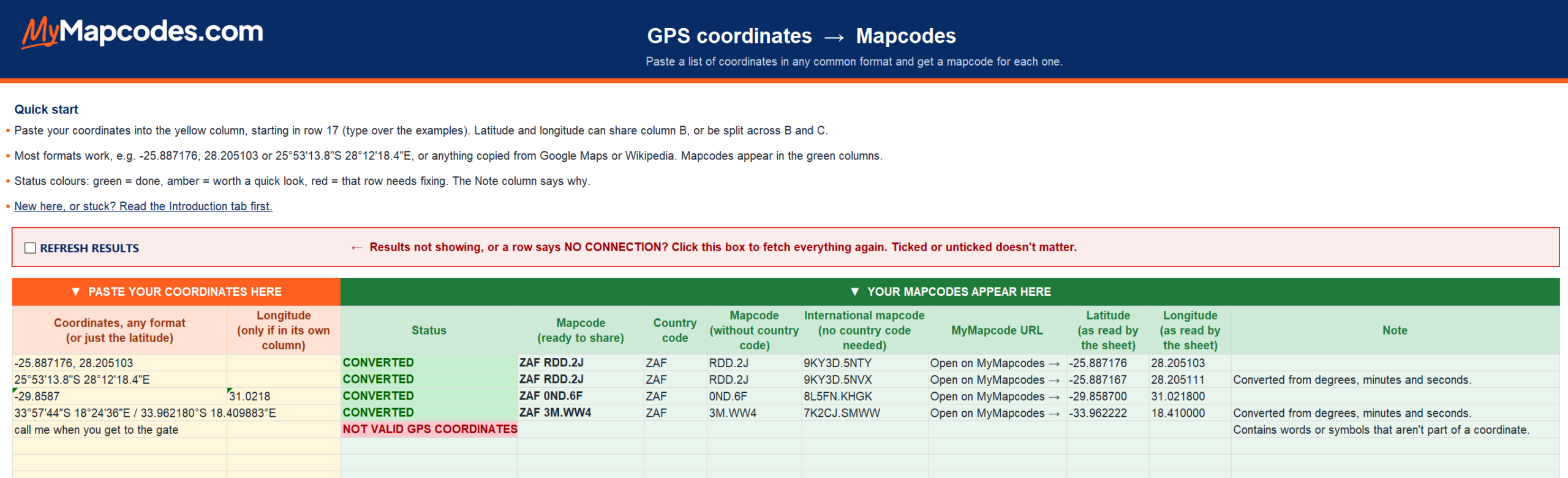
How it works
1. Open the file and click Enable Editing, then Enable Content, on the yellow bars at the top of Excel.
2. Paste your coordinates or mapcodes into the yellow column.
3. Copy your results from the green columns.
Your list doesn’t need to be perfect. The sheet tidies up common formats and clearly flags any row that needs a closer look.
Safe for work computers
We know downloading a spreadsheet can feel risky, so here’s exactly what’s inside:
✔ No macros. Just ordinary Excel formulas, which you’re welcome to inspect.
✔ It only contacts one website: the official Mapcode Foundation service (api.mapcode.com), and only to send the coordinates or mapcodes you paste in.
✔ Excel’s two yellow security bars are normal. They appear for any downloaded file that fetches information from the internet. The first page of the file shows both and explains what each one means.
Needs Excel on a Windows computer (Microsoft 365, or Excel 2013 or newer). It won’t work in Excel for Mac, Excel online or on a phone.
Based on an Excel example originally provided by the Mapcode Foundation. Mapcodes are free and open source (here’s why), and developers can find more converters, documentation and the full mapcode library on the Mapcode Foundation’s website.